Y2K camcorder AI photo prompts: timestamps, flash and VHS blur
Published
Short answerUpload a clear photo, tell the AI to keep every face the same, then ask for the camcorder look by name: a date timestamp in the corner, harsh on-camera flash, soft low-resolution detail, slight colour bleed and scan lines. The flaws are what make it look real.
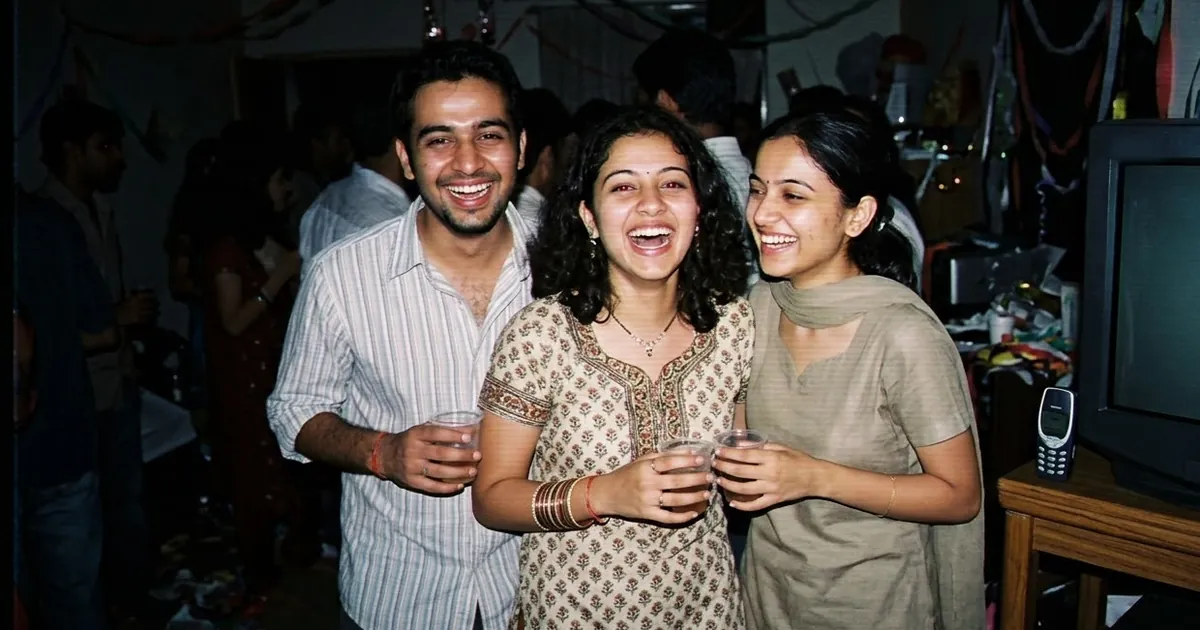
One of the biggest AI photo trends of 2026 isn't polished at all. People are turning today's photos into grainy frames that look like they came off a family camcorder or a 2003 pocket digital camera. eWeek's roundup of 2026 photo trends describes the look: camcorder overlays, timestamp graphics, CRT distortion and low-resolution flash photography.
Why is it so popular? After years of smooth, perfect AI faces, a slightly bad photo feels real. The prompts below get that look in Gemini, ChatGPT or any image tool that edits your own photo.
What makes a photo look "Y2K camcorder"
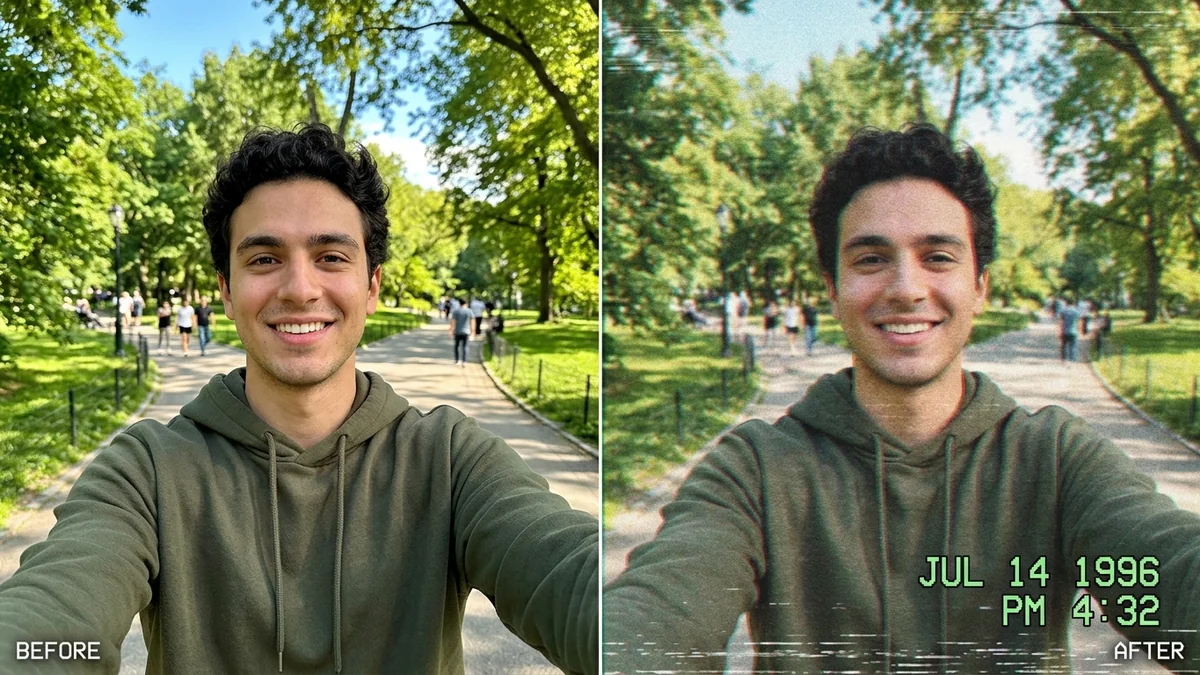
The look comes from four things. Name each one in your prompt and the result improves a lot:
- The timestamp. An orange or white date in the bottom corner, like "OCT 14 2002 9:47 PM".
- Harsh flash or dim light. Direct on-camera flash with dark backgrounds, or the murky orange of indoor bulbs.
- Low resolution. Soft detail, a little blur on anything moving, blocky shadows.
- Tape flaws. Faint scan lines, slight colour bleed around edges, and a small wobble at the bottom of the frame.
The camcorder still
This is based on the VHS camcorder prompt. It works best on group photos and anything with movement:
Turn this photo into a still frame from an early-2000s home camcorder video. Keep everyone's faces, identities and expressions exactly the same.

Look: low-resolution video, soft detail, slight motion blur, faint horizontal scan lines, mild colour bleed around bright edges, slightly washed-out colours.
Light: harsh on-camera light from the front, background falling into darkness.
Overlay: an orange digital timestamp in the bottom-right corner reading [DATE, e.g. DEC 31 2002 11:58 PM], and a small "PLAY ▶" in the top-left.
Aspect ratio 4:3. No modern phone look.
AI tools sometimes misspell or scramble the timestamp. If that happens, remove the overlay line and add the date afterwards in any photo editor. Old camcorder fonts are easy to copy.
The 2000s digital camera snap
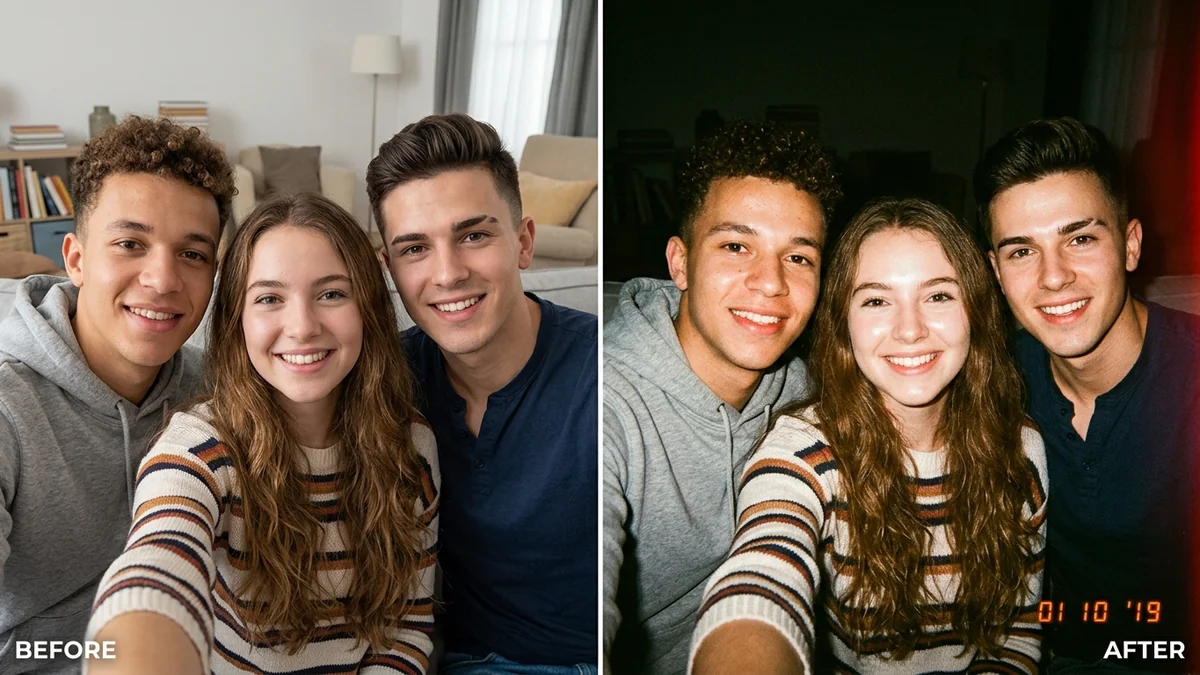
For a single portrait or a night out, a pocket digicam looks more authentic than video. Use the Y2K digital camera prompt, or this version:
Make this look like a photo taken on a cheap 2003 compact digital camera. Keep my face and outfit exactly the same.

Harsh direct flash, bright face against a dark background, slight red-eye, blown highlights on skin, a little noise in the shadows, cool blue-grey colour cast. Slightly tilted framing, as if a friend took it quickly. Orange date stamp in the bottom-right corner. 4:3.
"Slightly tilted framing, as if a friend took it quickly" matters more than you'd think. Perfect framing gives away that it's AI.
Party and group photos
The trend is most fun with a group. Upload one photo with everyone in it and add a setting:
Keep every person's face exactly the same. Place the group at [SETTING, e.g. a crowded house party / a school annual day backstage / a birthday in a small living room] around the year 2002.

Details: [PERIOD DETAILS, e.g. a CRT TV in the corner, a cake with sparklers, flip phones in hands, low-rise jeans and frosted lip gloss].
Camera: on-camera flash, red-eye, soft focus, date stamp in the corner, 4:3.
Name real objects from the period. A CRT TV, a flip phone and wired earphones set the year better than "Y2K style".
Want a disposable-camera look instead?
A disposable camera gives warmer, grainier film colours and no timestamp. Try the disposable camera flash prompt if you want film rather than video. For a physical print feel, frame the result with the Polaroid frame prompt.
Make it move
A still that looks like video is even better as a short clip. Take your picture into Kling, Veo or Higgsfield with the cinematic memory pan prompt and add "handheld camcorder shake, VHS tracking lines" to the motion. Five seconds is enough for a Reel.
Fixing common problems
It looks too sharp and clean. Add "low resolution, soft detail, like a frame captured from video tape".
The faces changed. Put "keep everyone's faces exactly the same" on the first line, and use a photo where faces are clear and not too small.
The timestamp is gibberish. Leave it out of the prompt and add it afterwards.
The colours look like a modern filter. Ask for "slightly washed-out colours with a green-blue tint in the shadows".
Where to go from here
The viral AI photo trend prompts page collects every trend we cover. For another retro look, see our 80s AI photo trend prompts or the film look prompts. All the prompts here are free in photo editing prompts, and the prompt builder writes a custom one for your photo.
Quick checklist
- "Keep everyone's faces exactly the same" first.
- Timestamp, flash, low resolution, tape flaws.
- Name objects from the period.
- Slightly tilted framing.
- Add the date afterwards if the AI garbles it.
Comments
No comments yet. Be the first to share what worked for you.