AI family portrait prompts: festive group photos where everyone still looks like themselves
Published
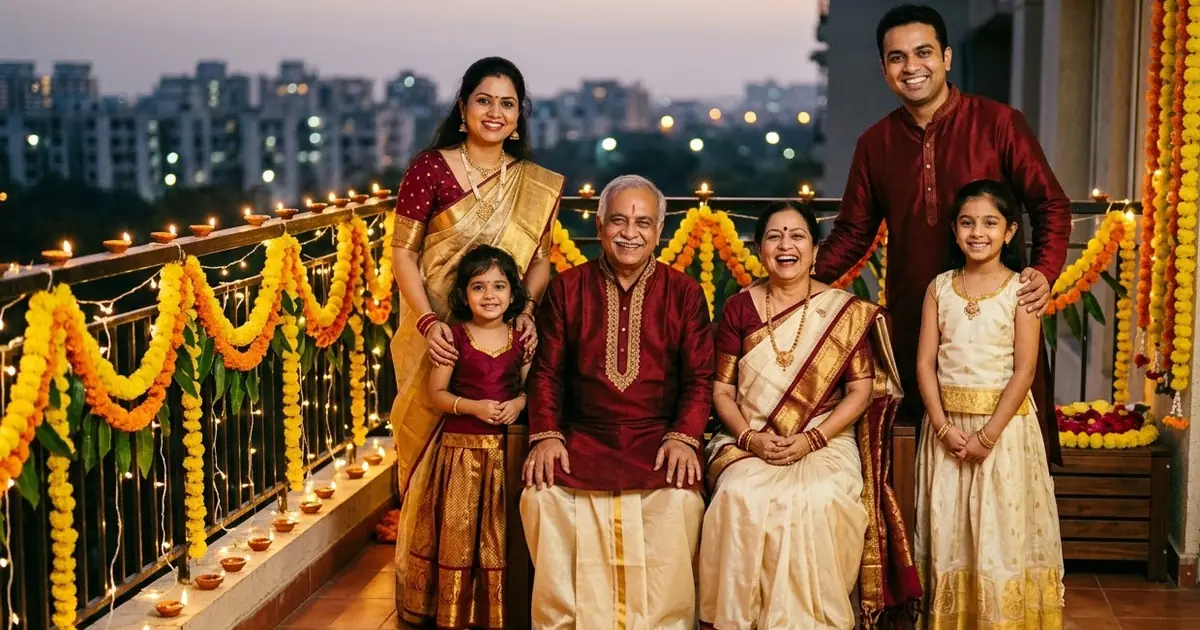
Short answerUse one clear group photo, tell the AI to keep every face and every person exactly the same, say how many people there are and where each one stands, then change only the setting, outfits or light. Count the people in the result before you share it.
Family photos are the hardest AI edit to get right. Every extra person is another face the AI can change, and group photos often come back with someone missing, someone new, or a child with the wrong face. With Diwali coming on Sunday 8 November 2026, and family gatherings through the festive season, here's how to get family portraits that everyone recognises.
Start with the best group photo
- Everyone's face visible, nobody half-hidden behind someone else.
- Daylight or bright indoor light. Night photos with flash lose detail.
- A higher-resolution photo. If each face is tiny, the AI has to guess.
If your only good photo is a bit dark, fix the light first, then do the festive edit.
The main prompt
This builds on our Diwali family portrait prompt:
This photo shows [NUMBER] people. Keep every person exactly the same: same faces, same ages, same hair, same body shapes, same positions. Do not add or remove anyone.

Change only:
- Outfits: festive Indian clothes in [COLOURS, e.g. deep maroon, gold and cream], silk kurtas and sarees.
- Setting: a balcony decorated with marigold torans, fairy lights and lit diyas.
- Light: warm evening light from the diyas, soft glow on every face.
Style: natural family photography, everyone smiling, sharp faces. Landscape 3:2. No text.
"This photo shows [NUMBER] people" and "Do not add or remove anyone" are the two most important lines. Count the people in the result before you share it.
Matching outfits
Matching or colour-coordinated outfits are popular for festival photos. The matching family outfits prompt handles this. Be specific: "all in shades of green; the men in kurtas, the women in sarees, the children in lehenga and kurta". Mention children's outfits separately, or the AI may dress them like adults.
Bring in someone who is far away
Many families have someone who can't come home for Diwali. You can add them from a separate photo:
The first photo is our family. The second photo is my brother, who lives abroad. Add him standing at the right end of the group, next to my father. Keep everyone's face exactly the same, including his. Match the light on him to the rest of the photo.
Say where the new person stands, and ask for matching light. Before you share, tell the family it's an edited photo. Some people are happy with it; others find it odd.
A sensitive note: some people use this to add a relative who has passed away. It can be comforting, but check with close family first. It can also upset people.
Restore an old family photo
Old prints from the family album are worth saving. Photograph the print flat in daylight, then use the 1950s family colourising prompt or ask: "Restore this old photo: repair scratches and fading, keep every face exactly the same, do not add detail that isn't there." Keep a copy of the original. Restored photos are an interpretation, not the truth.
Milestones
The graduate with family prompt is good for results day and convocations. The same approach works for anniversaries, housewarmings and a new baby's welcome.
Make it move
For a short, warm clip, take the finished photo into a video tool with the family laughing prompt: small movements, laughing, looking at each other. Keep it to 5 seconds. The more people in the frame, the more likely a face drifts in a long clip.
Fixing common problems
Someone looks different. Crop so faces are larger, and say "Keep every person exactly the same" first.
Someone is missing or extra. State the number of people and "do not add or remove anyone".
Children look older. Add "keep the children's ages exactly as they are".
Everyone looks too perfect. Add "natural skin texture, real family photo, not retouched".
Where to go from here
Plan the decorations with our Diwali home decoration AI prompts and see more festive ideas in our Diwali AI photo prompts. All the prompts here are free in the photo editing prompts collection.
Quick checklist
- One clear group photo.
- State the number of people.
- "Keep every person exactly the same".
- "Do not add or remove anyone".
- Count the people before sharing.
Comments
No comments yet. Be the first to share what worked for you.