- Updated
Then-and-now photo transition
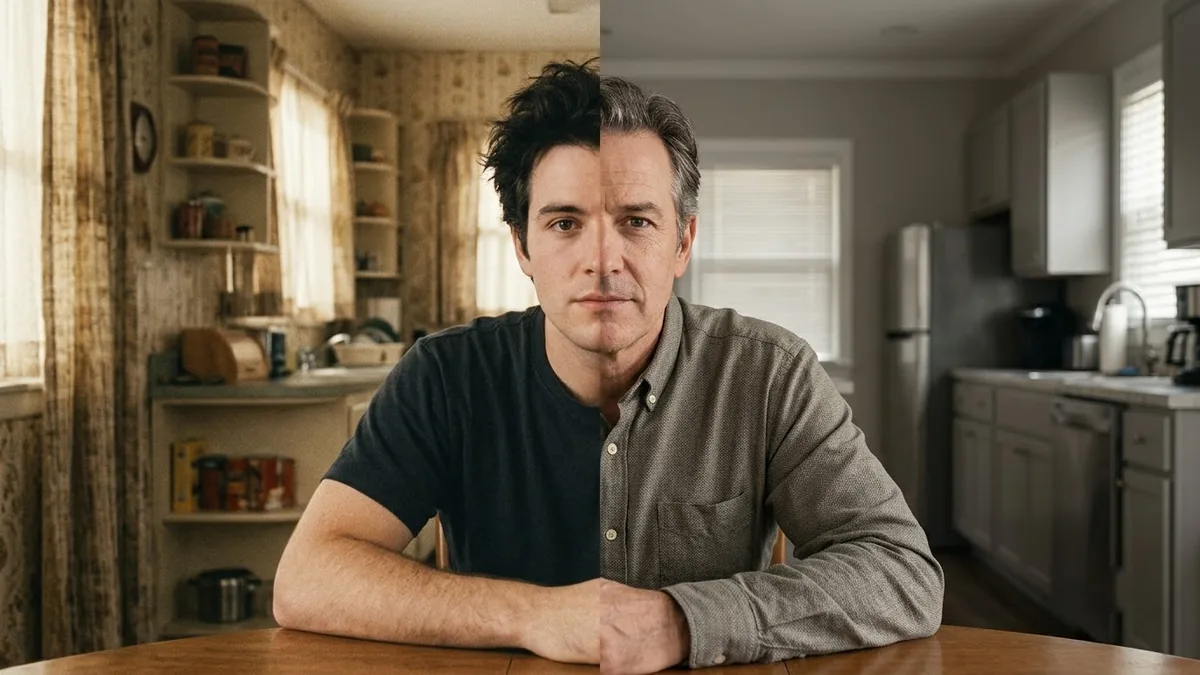
This prompt creates a smooth transition from the first photo, an old photo from a year you name, to the second, a current one.
Create a smooth transition from the first photo (an old photo of me from [YEAR]) to the second photo (a recent photo of me), keeping the same pose and framing: the clothes, hairstyle and background gradually update while my face ages naturally and consistently. Locked camera, elegant morph, 6 seconds.
Use photos with a similar pose and angle for a smoother transition.
Get a better result
A 6-second locked-camera morph from an old photo of you to a recent one: same pose and framing, with the clothes, hairstyle and background gradually updating while your face ages naturally.
The face jumps between two different people in the middle of the morph.
Fix: Use two photos where your head has the same size, angle and position in the frame. A mismatch forces the AI to invent what is in between.
- The background changes all at once. Say “the background changes slowly and last, after the clothes and hair”. An order makes the morph easier to follow.
- Your face does not match the real photos at the start or the end. Add “the first frame matches the old photo and the last frame matches the recent photo exactly”, then compare those two frames with your photos.
Put the recent photo first and the old one second, for a clip that ends in memory. Some people find a clip that runs back in time more emotional.
The first frame must match the old photo and the last frame the recent photo. Keep the same pose and head position and change things slowly.
Guides that use this prompt
More video generation prompts
See all 489 →
More like this
- Seamless Transition promptHiggsfield · Kling
- Flying Cam transition promptHiggsfield · Kling
- Raven Transition promptHiggsfield · Kling
- Furniture showroom adVeo · Kling · Seedance
- Colour powder explosionVeo · Kling · Seedance