- Updated
Motorcycle road trip portrait
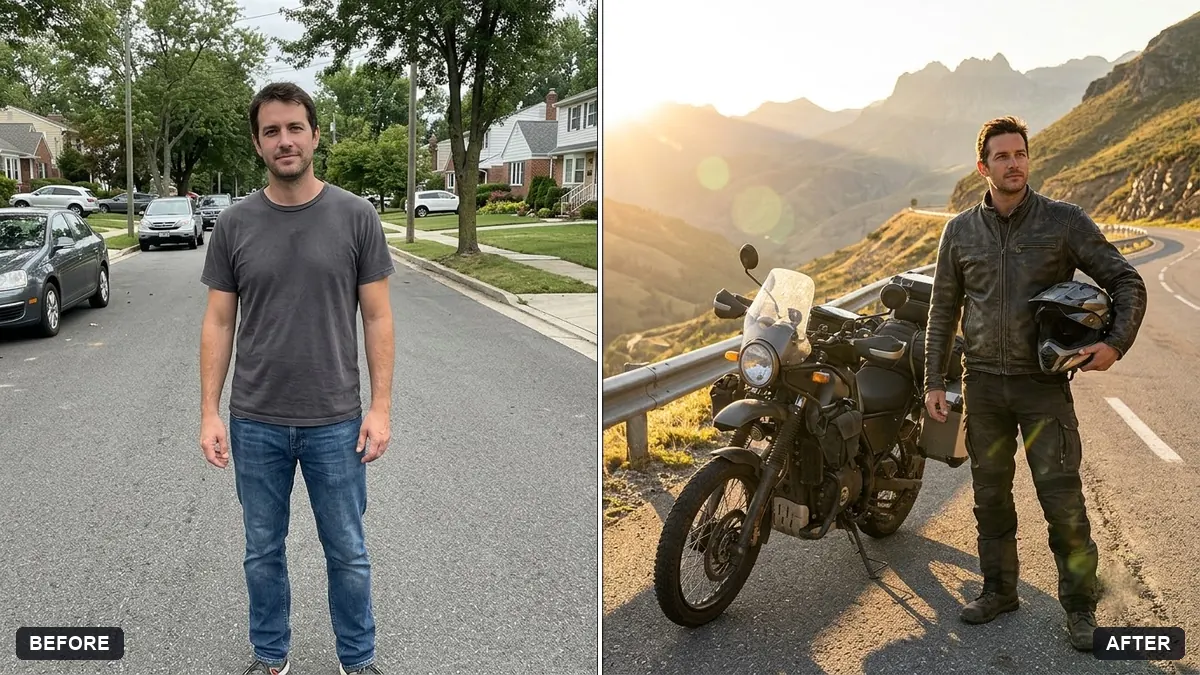
This prompt places you next to a touring motorcycle in a colour you choose on a mountain road, in riding gear with a helmet in your hand.
Place me next to a [COLOUR] touring motorcycle on a mountain road with a helmet in my hand. Keep my face, body and features exactly the same.

Wear a riding jacket and gloves, golden hour light, dramatic valley behind, a confident relaxed look, adventure photography.
Use a helmet in the prompt if you want it to look safety-conscious.
Your photo goes to the AI app you choose, never to PromptUp.
Get a better result
An adventure portrait of you standing beside a touring motorcycle in your chosen colour on a mountain road at golden hour, in a riding jacket and gloves with a helmet in your hand.
Standing next to the bike with a helmet in hand gives a relaxed, after-the-ride moment, which is easier for AI to render than riding. A riding jacket and gloves make the scene believable and safety-minded. Golden hour light and a dramatic valley add adventure. The colour blank lets you match your own motorcycle.
The bike is out of scale with you.
Fix: Ask for the bike beside you with the seat around your hip height, as touring bikes are.
- Your body shape is changed. Use a full-body photo and say “keep my body exactly the same, only change the clothes”.
- No helmet in sight. Keep the helmet in your hand, as the tip says. It makes the photo look like a real ride.
Swap the mountains for a coastal road with cliffs and blue sea, late afternoon.
Keep my face and the bike. Add the route name, [ROUTE], on a road sign in the background, spelled exactly as written.
More photo editing prompts
See all 334 →
More like this
- Motorcycle hero shotGemini · ChatGPT
- Ladakh road tripVeo · Kling · Seedance
- Road trip itineraryChatGPT · Gemini · Claude
- Motorcycle on a mountain passVeo · Kling · Seedance
- Astronaut portraitGemini · ChatGPT