- Updated
Motorcycle hero shot
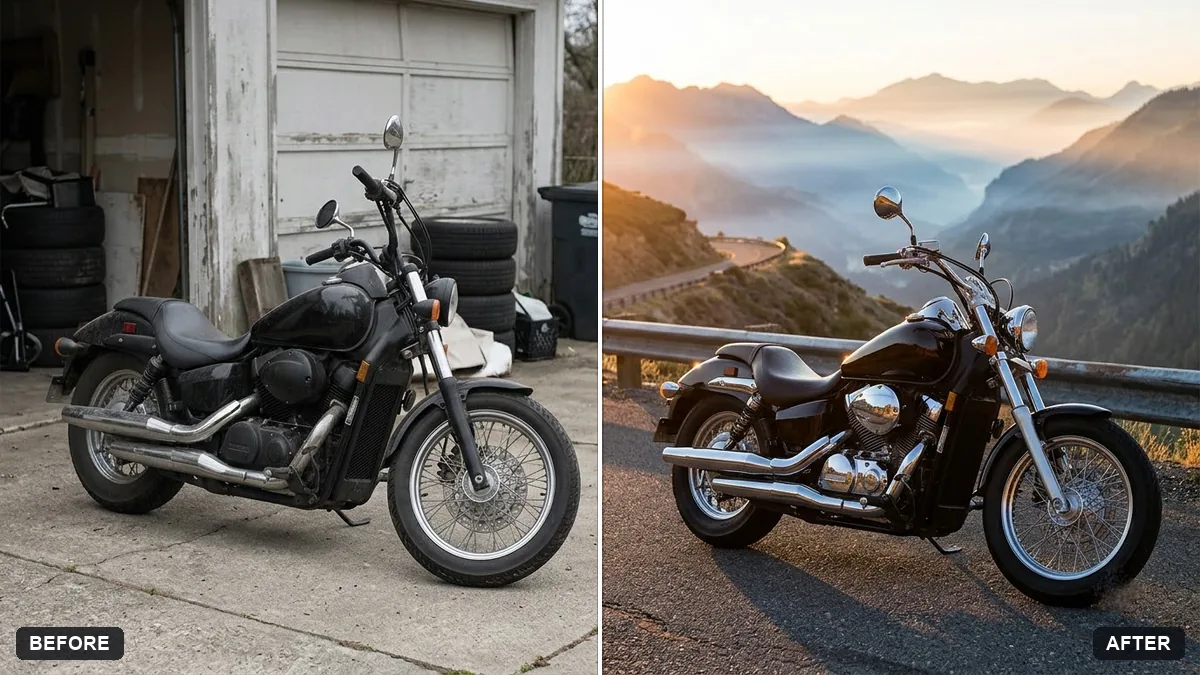
This prompt places your motorcycle in a new setting for a hero image, keeping its shape, colour, decals and details exactly the same.
Turn this photo of my motorcycle into a hero image. Keep the bike's shape, colour, decals and details exactly the same.

Set it on a [MOUNTAIN ROAD / CITY STREET] at dawn, with dramatic side light, subtle mist, glints on the chrome and tank, dark moody sky, low three-quarter angle, sharp focus on the engine.
Add a rider silhouette only if you want a lifestyle feel.
Your photo goes to the AI app you choose, never to PromptUp.
Get a better result
A low three-quarter hero shot of your motorcycle on a mountain road or city street at dawn, with side light, thin mist, glints on chrome and the tank and a dark sky, with the engine sharp.
A low three-quarter angle shows the bike’s side and front at once, which is the classic hero view. Dawn side light, mist and glints on the chrome and tank add drama. Keeping the shape, colour, decals and details exactly the same is what makes it your motorcycle and not a generic one.
Decals are changed or invented.
Fix: Use a clear side photo and say “keep every decal and colour exactly the same”.
- The bike looks like it is floating. Ask for tyres on the road with contact shadows and the side stand down.
- A random rider appears. Say “no rider” unless you want the lifestyle silhouette the tip mentions.
Ask for a dark workshop with a single hanging lamp, tools on the wall and a light shine on the tank.
Keep the bike exactly the same, including decals and any wear. Make the road and light a little more dramatic, without changing the bike.
Guides that use this prompt
More photo editing prompts
See all 334 →
More like this
- Motorcycle road trip portraitGemini · ChatGPT
- Motorcycle on a mountain passVeo · Kling · Seedance
- Website hero image from a photoGemini · ChatGPT
- Burger hero shotGemini · ChatGPT · Midjourney
- Electric scooter hero shotGemini · ChatGPT · Midjourney