- Updated
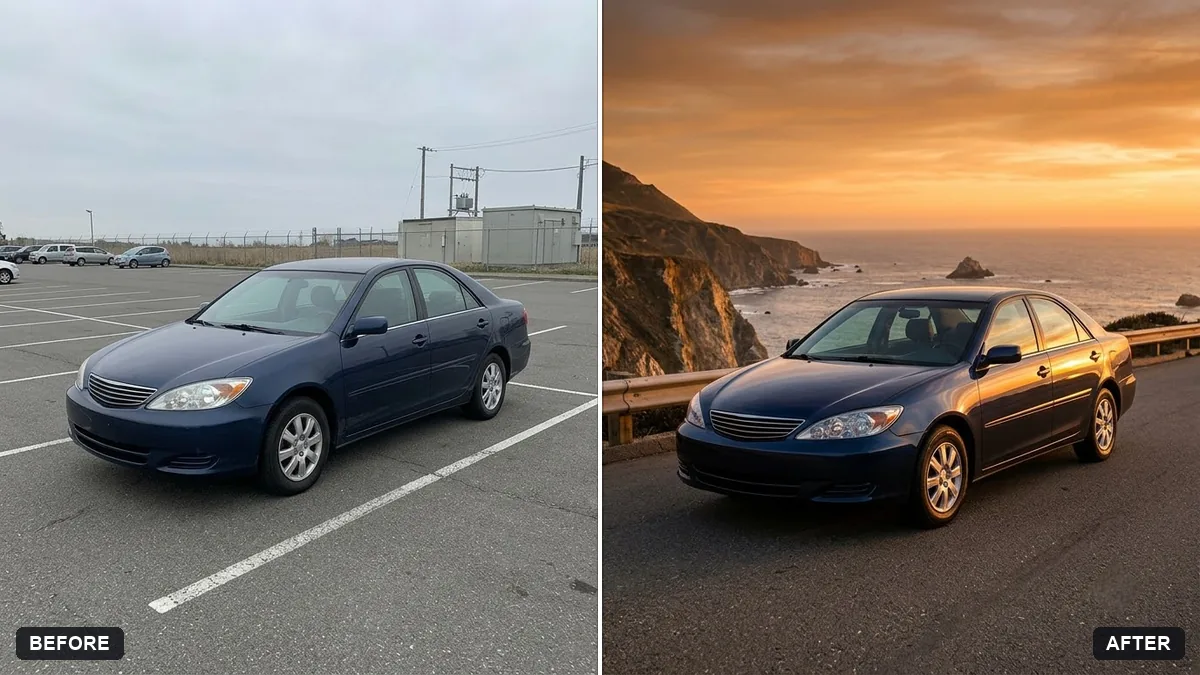
Car hero shot at sunset
This prompt turns a car photo into a sunset hero image, keeping the car's model, colour and details exactly the same.
Turn this car photo into a dramatic sunset hero shot. Keep the car's model, colour and details exactly the same.

Position it on an open [ROAD TYPE, e.g. coastal] road with a warm orange sky, low sun flare, long shadows and light reflections along the body, motion blur on the road, low camera angle, cinematic colour grade.
Ask for a rolling-shot version with a blurred background to feel fast.
Your photo goes to the AI app you choose, never to PromptUp.
Get a better result
A low-angle sunset shot of your car on an open road, with a warm orange sky, sun flare, long shadows, light running along the body and motion blur on the road.
The car’s model, colour and details stay exactly the same, so it is still your car. Warm sky, low sun flare and long shadows add drama. A low angle and motion blur on the road suggest speed.
The car turns into a newer model.
Fix: Name the make, model and year and say “keep the exact body shape, lights and badges”.
- The sun flare washes out the car. Ask for the sun low behind and to the side, with the flare away from the bodywork.
- The car looks parked though the road blurs. Ask for slightly blurred wheels and a sharp body, as in the rolling-shot version the tip mentions.
Ask for a wet city street at night with neon reflections on the road and raindrops on the paint.
Keep the car exactly the same. Give me a wide 16:9 version and a tall 9:16 version with the car in the same place.
Guides that use this prompt
More photo editing prompts
See all 334 →
More like this
- Classic car on a coastal roadMidjourney · Gemini · ChatGPT
- Synthwave sunset highwayMidjourney · Gemini · ChatGPT
- Burger hero shotGemini · ChatGPT · Midjourney
- Website hero image from a photoGemini · ChatGPT
- Electric scooter hero shotGemini · ChatGPT · Midjourney