- Updated
Colour gel studio portrait
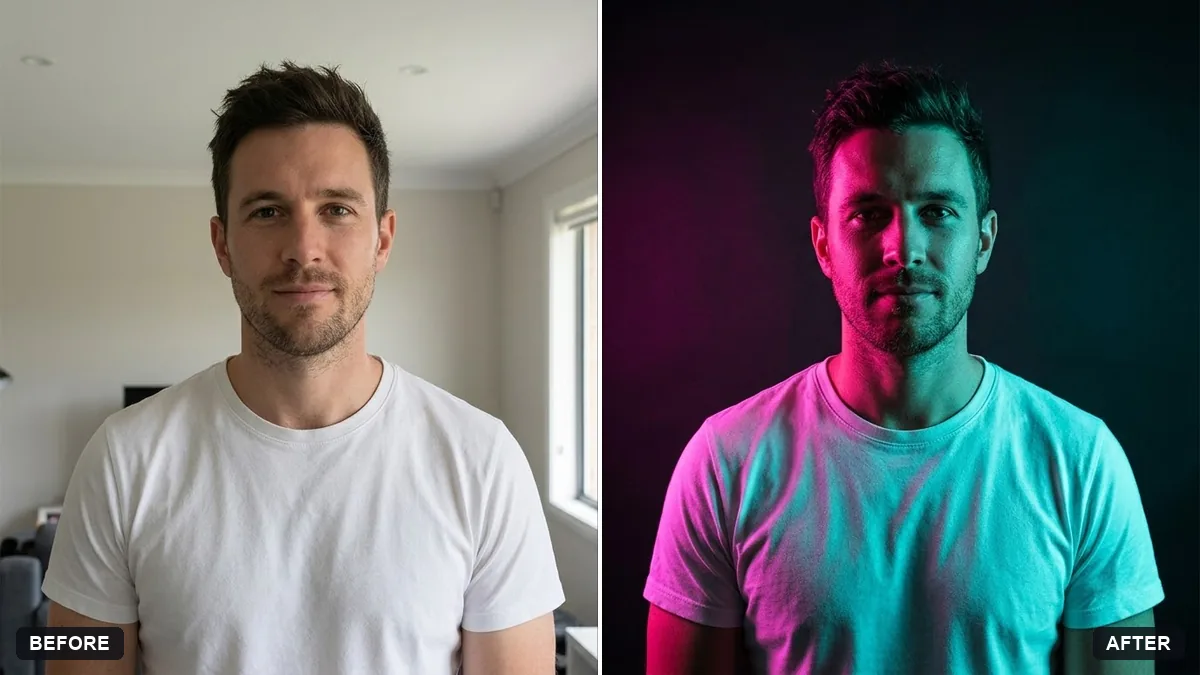
This prompt creates a high-fashion editorial portrait lit by two coloured gels, one from each side, against a dark backdrop with crisp shadows. Use two colours opposite each other on the colour wheel.
Turn this photo into a studio portrait lit with two coloured gels: [COLOUR] from the left and [COLOUR] from the right. Keep my face and features exactly the same.

Dark backdrop, crisp shadows, glossy skin highlights, minimal styling, high fashion editorial style.
Use two colours opposite each other on the colour wheel for a striking look.
Your photo goes to the AI app you choose, never to PromptUp.
Get a better result
A dark-backdrop studio portrait lit from the left and right by two coloured gels, with crisp shadows, glossy skin highlights, minimal styling and a high-fashion editorial look, with your face unchanged.
Gel lighting means coloured light from each side, so the prompt names both colours and their directions. A dark backdrop stops the colours from washing out, and crisp shadows keep your face shaped. Glossy highlights on the skin catch the gels. Picking colours that sit opposite each other on the colour wheel, as the tip says, gives the strongest contrast.
The two colours blend into a muddy purple on the face.
Fix: Say “one colour hits only the left side of the face, the other only the right, with a clear dark line between them”.
- The skin looks plastic under the glossy highlights. Ask for “glossy highlights on the cheekbones and nose only, natural skin texture everywhere else”.
- The backdrop is not dark, so the colours look flat. Repeat “near-black backdrop”. Colour on a dark ground looks richer.
For a simpler look, use “one deep red gel from the left, the right side falling into shadow”. One colour gives a stronger, simpler mood.
Keep my exact face from the original photo: same eyes, nose, smile, skin tone and age. Change only the style.
Guides on this topic
More photo editing prompts
See all 334 →
More like this
- Artist in the studioGemini · ChatGPT
- Cosy bookstore portraitGemini · ChatGPT
- Snowy winter portraitGemini · ChatGPT
- Superbike in a dark studioMidjourney · Gemini · ChatGPT
- Golden wheat field portraitGemini · ChatGPT