- Updated
Tattoo design idea
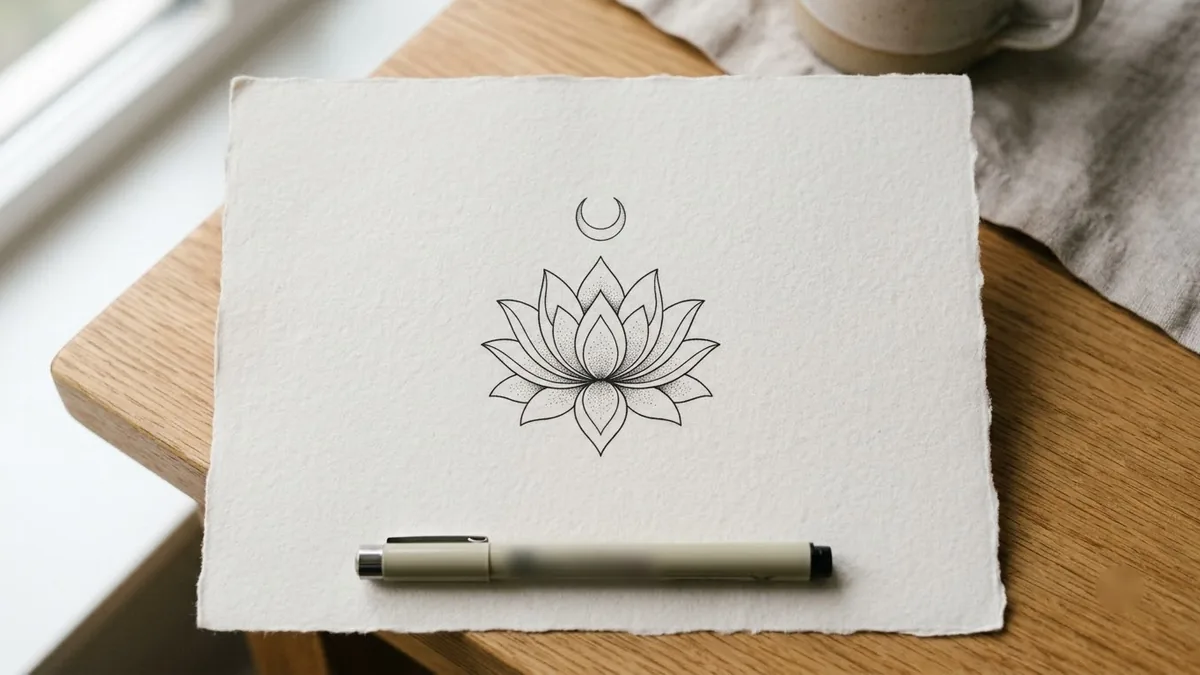
This prompt designs a tattoo, for example a fine-line lotus with a crescent moon, with clean black linework and a balanced composition. You set the style, placement and size. Take the design to an artist before you commit.
Design a [STYLE, e.g. fine-line minimalist] tattoo of [SUBJECT, e.g. a lotus with a small crescent moon].

Placement: [PLACEMENT, e.g. inner forearm], about [SIZE, e.g. 10 cm] tall. Clean black linework and a balanced composition, with no shading unless the style needs it.

Show the design centred on plain white paper, as a clear stencil a tattoo artist could use.
Take the design to a real tattoo artist to adapt it to your skin and placement.
Get a better result
A clean stencil-style design in your chosen style, centred on plain white paper with clear linework, shown at the size and placement you described.
The lines are too fine to tattoo.
Fix: Ask for slightly bolder linework and fewer tiny details. Very thin lines can blur as skin ages.
- The design does not fit the body part. State the shape of the space, such as long and narrow for a forearm, so the layout suits it.
- It looks like a stock image. Add a personal detail or a meaningful symbol, and avoid copying an existing artist’s work.
Ask for a simplified version about half the size, with fewer details and thicker lines for a small placement.
clean lines that work at real size on the skin, no fine details smaller than a few millimetres, simple shapes a tattoo artist can adapt
Guides that use this prompt
More image generation prompts
See all 347 →
More like this
- Preview a tattoo placementGemini · ChatGPT
- Tattoo Animation video promptHiggsfield · Kling · Veo
- Artist in the studioGemini · ChatGPT
- Intricate mandala patternMidjourney · Gemini · ChatGPT
- 30 Reel ideas for your nicheChatGPT · Gemini · Claude