- Updated
Night car chase through the city
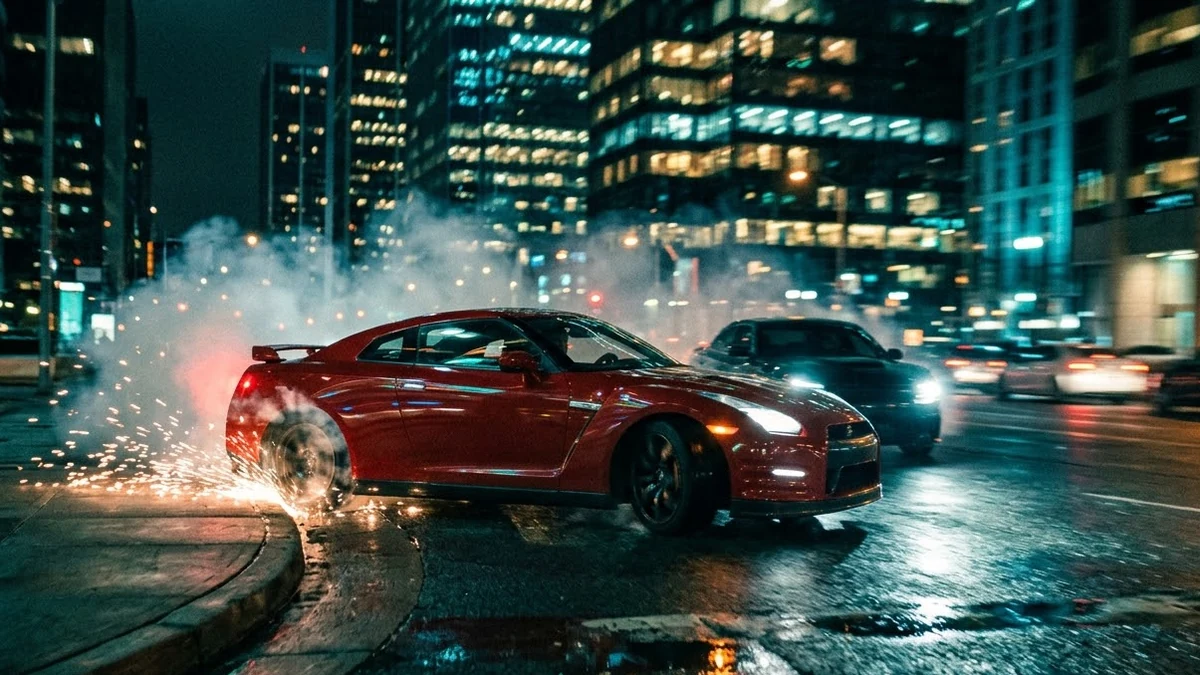
This prompt describes a sports car in a colour you choose drifting around a corner in a rainy city at night, with headlights streaking across wet asphalt.
A high-speed night chase through a rainy city: a [COLOUR] sports car drifts around a corner, headlights streaking across wet asphalt, sparks from a scrape, a second car close behind, camera whips from a low front angle to a drone pull-up, neon reflections, roaring engines, cinematic teal and orange grade.
Use fictional vehicles with no brand badges.
Get a better result
A fast chase through a rainy city at night: a sports car drifts around a corner, headlights streak across wet asphalt, a second car follows, and the camera whips low then pulls up over neon reflections.
Brand badges or number plates show on the cars.
Fix: Use fictional vehicles, as the tip says, and add “no logos, plates or text on the cars”.
- The two cars morph into each other during the drift. Give them different colours and shapes, such as “a low red sports car chased by a black boxy sedan”, and keep the camera moves to two.
- Sparks and rain make the picture muddy. Say “clear, high-contrast frames, a few sparks only, teal and orange grade”. Fewer effects read as sharper.
Replace the cars with “a motorbike weaving through narrow lanes, the rider in a dark jacket, a second bike close behind” and keep the rain. Narrow streets add speed without changing the grade.
A low red sports car chased by a black boxy sedan, no logos or plates, two camera moves only, and a clear teal and orange grade.
More video generation prompts
See all 489 →
More like this
- Car Drive video promptHiggsfield · Kling · Veo
- Dynamic anime roof chaseKling · Veo
- Rooftop chase action sequenceHiggsfield · Seedance
- Electric car launch teaserVeo · Kling · Seedance
- Motorcycle on a mountain passVeo · Kling · Seedance