- Updated
Heist corridor with laser beams
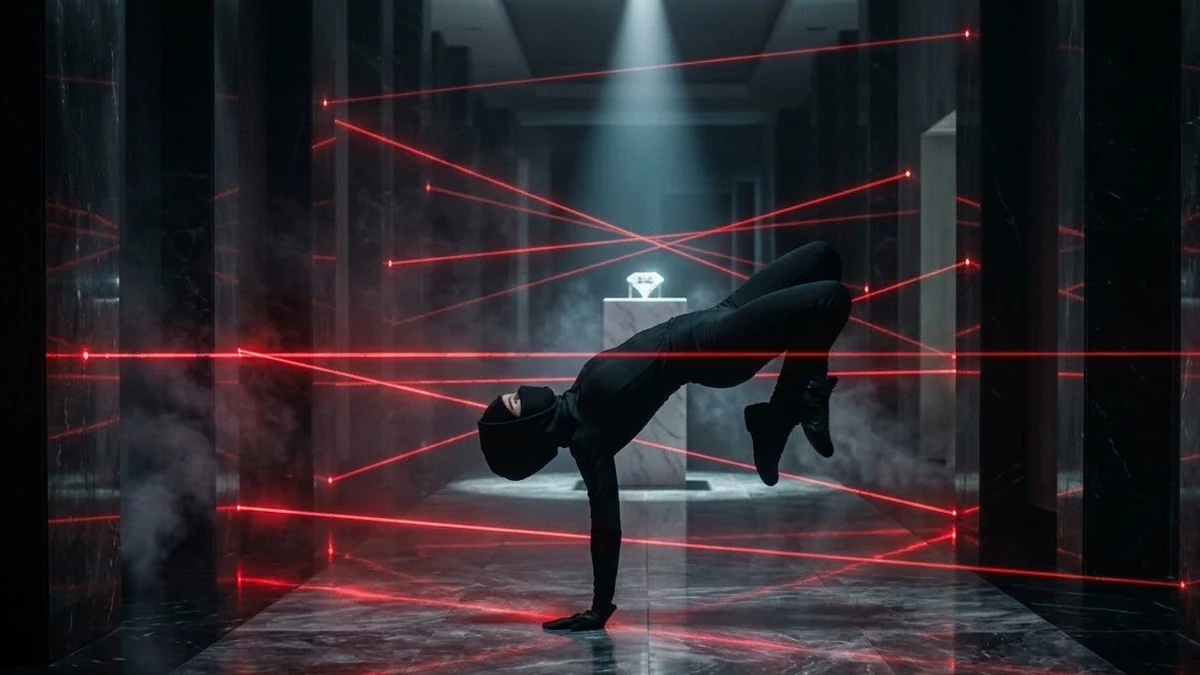
This prompt shows a thief in black slowly bending and flipping through a corridor of red laser beams, with smoke revealing each beam.
A stylish heist scene: a thief in black slowly bends and flips through a corridor of red laser beams, smoke revealing each beam, slow-motion contortions, close-up of a hand reaching for a glowing [OBJECT, e.g. diamond] on a pedestal, fast cut to an alarm light flashing, tense electronic score, cool blue and red lighting.
Cut the clip short. Fast, punchy edits make it feel like a trailer.
Get a better result
A stylish heist moment of a thief in black bending and flipping through red laser beams made visible by smoke, a hand reaching for a glowing object on a pedestal, then a quick cut to a flashing alarm, all in cool blue and red light.
Heist scenes rely on tension then release, and the alarm cut gives that release. Smoke is the detail that makes lasers readable, so it is in the prompt for a reason. Blue and red light sets a cool, dangerous tone, and the close-up of the hand gives the audience the moment to hold their breath.
The lasers are invisible.
Fix: Keep the smoke in the prompt. Beams only show when there is dust or haze in the air.
- The thief’s body twists unnaturally. Ask for one slow bend and one step over a beam, not a full flip, and use slow motion.
- The clip runs long and loses tension. Cut it short, as the tip says, with the alarm as the last frame.
Ask for a cat strolling through the lasers instead of a thief, knocking the diamond off the pedestal.
thick smoke so every laser beam shows, one slow bend under a beam instead of a flip, end on the alarm light
More video generation prompts
See all 489 →

More like this
- Sneaker hero ad with fast cutsKling · Veo · Seedance
- Epic mythology-style trailer shotsHiggsfield · Seedance