- Updated
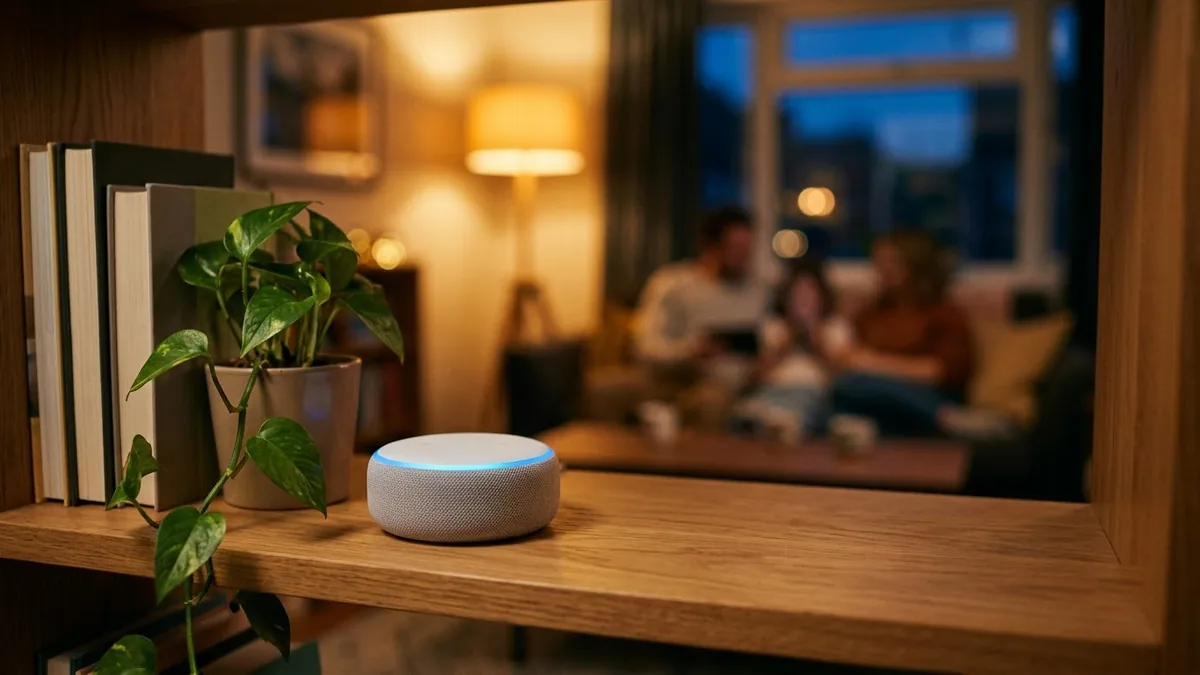
Smart speaker in a living room
This prompt shows a smart speaker in your colour on a bookshelf with a soft glowing light ring, with a family relaxing out of focus, plants and lamps.
A compact [COLOUR] smart speaker on a bookshelf in a warm living room with a soft glowing light ring, a family relaxing on a sofa out of focus, plants and lamps, cosy evening mood, modern smart home lifestyle photography. --ar 16:9
Use a warm home setting to make the technology feel friendly.
Get a better result
A warm evening living room scene with a small smart speaker in your colour on a bookshelf, a glowing light ring, a family relaxing on a sofa out of focus, plants and lamps around.
Lifestyle shots sell how a product fits into life, so the speaker sits among books and people instead of on a white background. Blurring the family keeps the focus on the product while still showing who it is for. The glowing light ring gives the eye a bright point in the warm room.
The speaker looks like a known brand’s product.
Fix: Describe your own shape, such as “small fabric cylinder”, and add “no logos” to keep it generic.
- The family is sharp and the speaker blurred. Ask for “speaker in sharp focus in the front, family softly blurred behind” to keep the product the hero.
- The room looks cold and techy. Keep the warm home setting, as the tip says, with lamps and books close to the speaker.
Ask for the speaker on a kitchen counter in the morning with someone cooking in the background.
Keep the room, put the speaker in sharp focus at the front with the family softly blurred behind, and remove any logos.
More image generation prompts
See all 347 →

More like this
- Speaker photo for a conference pageGemini · ChatGPT
- Tech conference speaker on stageGemini · ChatGPT
- Warm up a living room for a rental listingGemini · ChatGPT
- Smart questions to ask the interviewerChatGPT · Gemini · Claude
- Translate while keeping tone and meaningChatGPT · Gemini · Claude