- Updated
Kurta on a clean backdrop
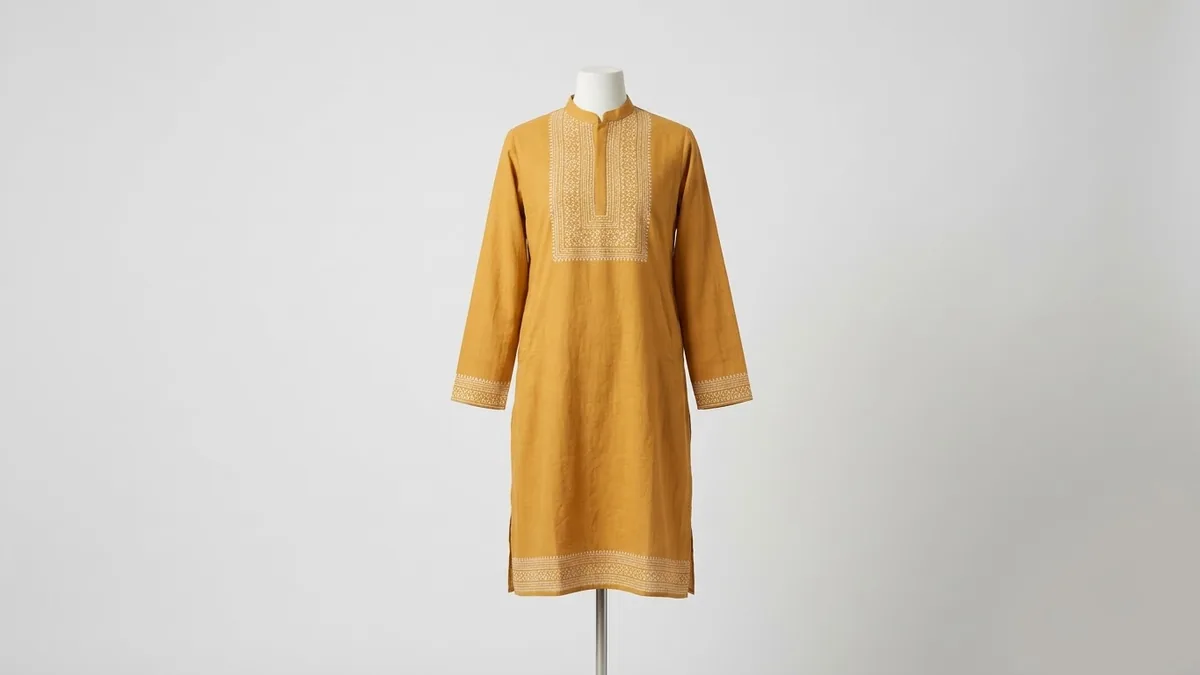
This prompt shows a cotton kurta in your colour with embroidery or block print detailing on a mannequin in even studio light, for shop listings.
Full-length catalogue image of a [COLOUR] cotton kurta with [EMBROIDERY / BLOCK PRINT] detailing on a plain mannequin against a clean light background, even studio lighting, sharp fabric texture, e-commerce fashion photography. --ar 4:5
Ask for a plain backdrop and neutral pose to keep the clothing as the focus.
Get a better result
A full-length catalogue image of a cotton kurta in your colour with embroidery or block-print detail, on a plain mannequin against a light background, evenly lit with sharp fabric texture.
Shop images must show the clothing clearly, so the prompt uses a plain mannequin, a clean light background and even studio light. Sharp fabric texture shows the quality of the cotton and the detail work. Naming embroidery or block print tells the model which kind of decoration to show up close.
It shows a kurta you do not sell.
Fix: Use this for mockups and mood only. For a real listing, upload a photo of your actual product and edit that.
- The print pattern is muddled. Describe the print in a few words, like “small indigo buti block print”, and keep it simple.
- The sleeves and hem are uneven. Ask for a straight, front-facing mannequin with even sleeves and hem.
Ask for a silk kurta with gold zari embroidery and a soft warm glow, for a wedding season collection.
Keep the kurta exactly the same. Use the same plain light background, mannequin and soft front light as my other product shots.
More image generation prompts
See all 347 →

More like this
- Shoe catalogue image setGemini · ChatGPT
- Furniture catalogue photoMidjourney · Gemini · ChatGPT
- Farewell group photo with a backdropGemini · ChatGPT
- Gym equipment catalogue imageGemini · ChatGPT · Midjourney
- Shoes on a display pedestalGemini · ChatGPT