How to open Windows God Mode, every setting in one folder
Published
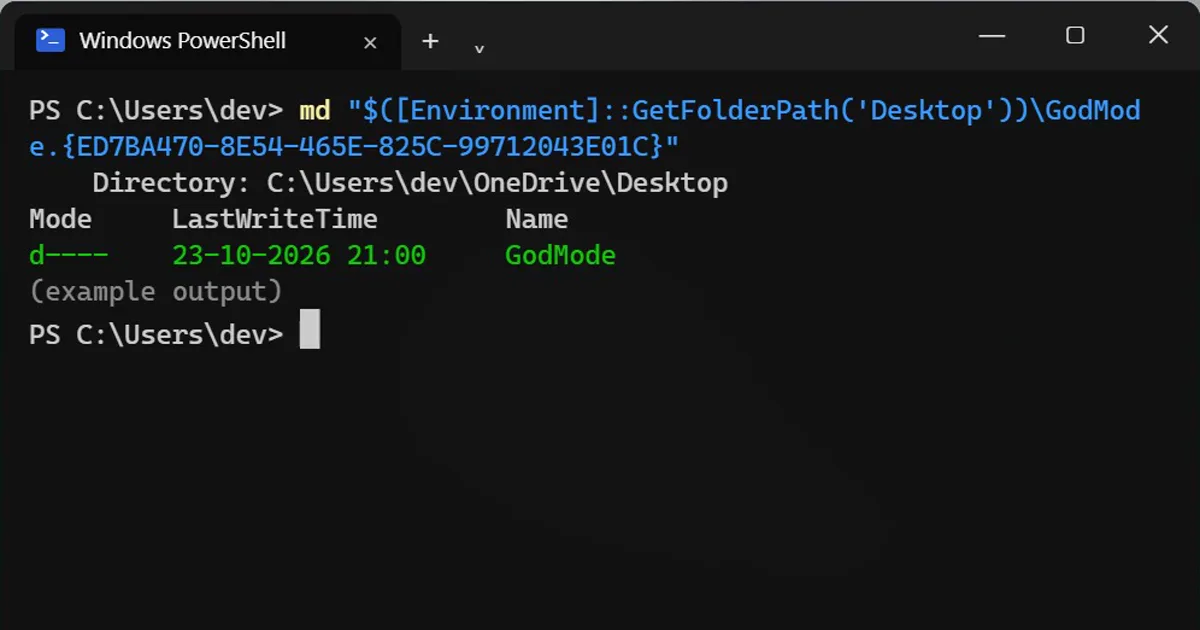
Short answerCreate a folder named GodMode.{ED7BA470-8E54-465E-825C-99712043E01C} on your desktop and it becomes a list of about 200 Control Panel settings. Or press Win+R and open shell:::{ED7BA470-8E54-465E-825C-99712043E01C} without making a folder.
"God Mode" sounds like a hack, but it's a normal Windows feature with a fun nickname. It's a special folder that shows every Control Panel setting in one grouped, searchable list. It works on Windows 10 and 11.
The one-liner
md "$([Environment]::GetFolderPath('Desktop'))\GodMode.{ED7BA470-8E54-465E-825C-99712043E01C}"Directory: C:\Users\dev\OneDrive\Desktop Mode LastWriteTime Name d---- 23-10-2026 21:00 GodMode
Look at your desktop: a new icon that looks like Control Panel. Open it for a long list of settings, about 200 depending on your Windows version, grouped by area (Power Options, Security and Maintenance, Devices and Printers...). Type in the search box to find one.
Why the long path?
If OneDrive backs up your desktop, your real desktop is OneDrive\Desktop, not C:\Users\<you>\Desktop. GetFolderPath('Desktop') finds the right one either way.
The name is up to you
Only the code after the dot matters. Settings.{ED7BA470-8E54-465E-825C-99712043E01C} works just the same.
Without making a folder
Press Win+R, paste this and press Enter:
shell:::{ED7BA470-8E54-465E-825C-99712043E01C}Is it safe?
Yes. It's a shortcut view, not a hidden mode: it only links to settings that already exist, and you need admin rights for the same ones you always did. Delete the folder like any other folder to remove it.
Many of these settings are older Control Panel pages. Microsoft keeps moving things into the Settings app, so some links open there instead.
On a Mac
There's no God Mode, but System Settings has a search box that finds any setting by name.
More quick tips
More prompts on this topic
- Thunder God video promptHiggsfield · Kling · Veo



Comments
No comments yet. Be the first to share what worked for you.