How to find programs running from strange folders on Windows
Published
Short answerRun Get-Process filtered to paths outside Windows and Program Files to see every running program from unusual folders. Apps like Discord and VS Code in AppData are normal; a Windows name such as svchost in the wrong folder is not.
Most real software lives in C:\Program Files or C:\Windows. Malware rarely does. It prefers Temp, Downloads and random AppData folders, often with a name copied from a real Windows file. One line shows everything running from outside the usual places.
Step 1: List programs outside the usual folders
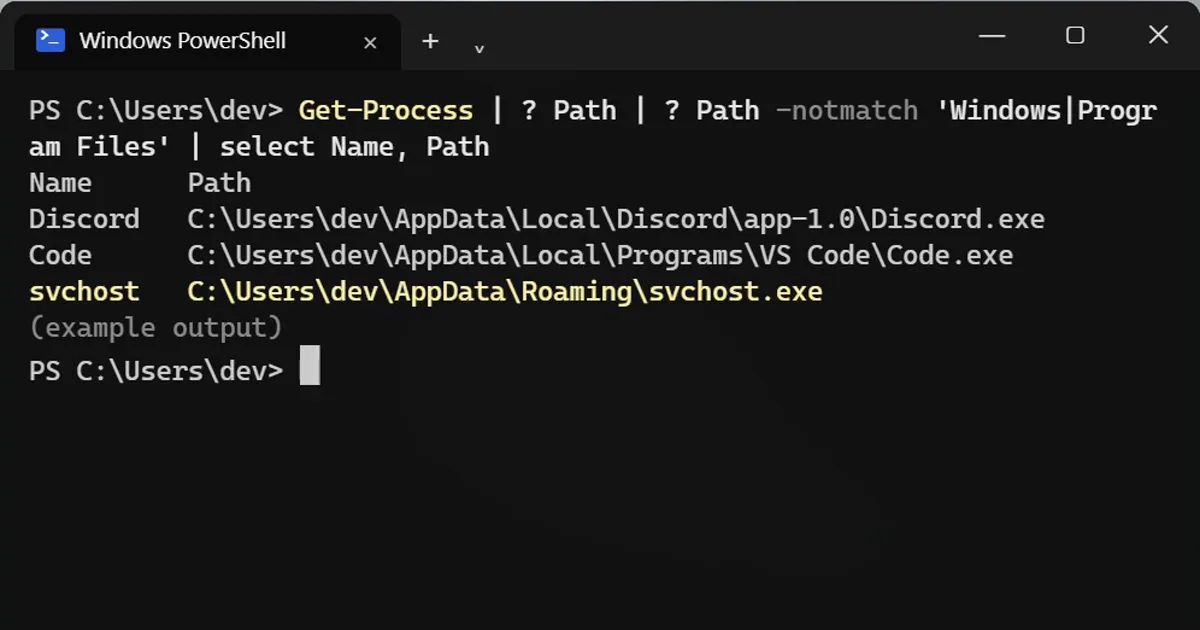
Get-Process | ? Path | ? Path -notmatch 'Windows|Program Files' | select Name, Path
Name      Path
Discord   C:\Users\dev\AppData\Local\Discord\app-1.0\Discord.exe
Code      C:\Users\dev\AppData\Local\Programs\VS Code\Code.exe
svchost   C:\Users\dev\AppData\Roaming\svchost.exe
It looks at every running program, skips the ones in Windows and Program Files, and shows the rest with their full path.
Step 2: Read the list
- Normal: many apps install for just your account in AppData: Discord, VS Code, Spotify, Zoom, Teams, WhatsApp, Slack, and most browser updaters.
- Suspicious: a Windows name in the wrong folder.
svchost.exe,explorer.exe,csrss.exeandlsass.exebelong inC:\Windows\System32(orC:\Windows). The same name in AppData or Temp is one of the oldest tricks there is. - Suspicious: random letters as a name, or anything running straight from Temp or Downloads that you didn't just open.
Step 3: Not sure about one?
Upload the file to virustotal.com. About 70 antivirus engines check it for free. You can also right-click the file, open Properties > Digital Signatures and see who signed it.
One catch: admin programs
Programs running as administrator or as Windows itself show no path when PowerShell is not elevated, so ? Path skips them. To include them, right-click PowerShell and choose Run as administrator, then run the same line.
On a Mac
Open Activity Monitor, double-click a process and choose Open Files and Ports to see where it runs from. Real apps live in /Applications or /System.
More quick tips
More prompts on this topic
- Create an event run-of-showChatGPT · Gemini · Claude
- Build a small command-line toolClaude · ChatGPT · Gemini



Comments
No comments yet. Be the first to share what worked for you.