- Updated
Tennis serve slow motion
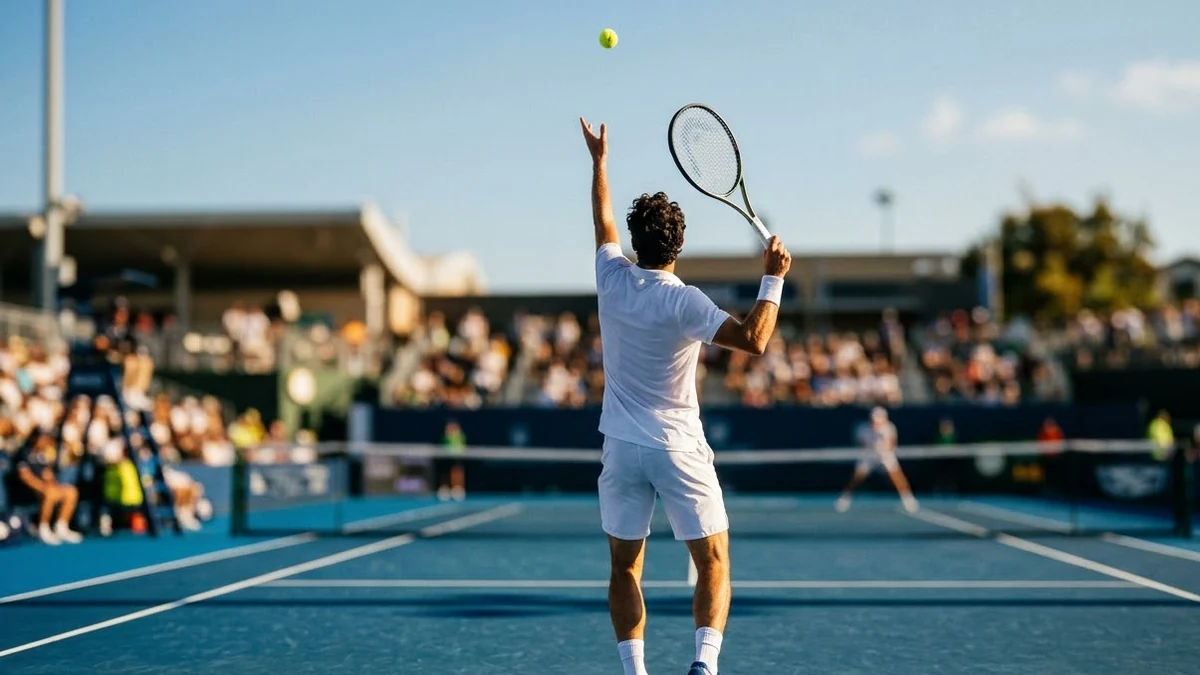
This prompt shows a player tossing the ball high on a sunny court, such as a hard court, and unleashing a powerful serve.
A tennis player tosses the ball high on a sunny [COURT, e.g. hard] court and unleashes a powerful serve in ultra slow motion, ball compressing on the strings, sweat and dust flying, camera behind the baseline then a side view, blue court and green background, crisp sound of the strike.
Ask for a close-up on the racket strings for a highlight shot.
Get a better result
An ultra slow-motion serve on a sunny court: the ball tossed high, a powerful swing, the ball squashing on the strings, sweat and dust flying, shown from behind the baseline and then from the side, with a crisp strike sound.
A serve is the one tennis shot that starts from stillness, which makes it perfect for slow motion. The prompt gives the key moments, the toss, the swing and the ball on the strings, and two camera angles to show both power and form. Sweat, dust and a crisp sound add impact, and the blue court with green background gives the familiar tournament look.
The ball does not touch the strings or passes through the racket.
Fix: Ask for a clear moment of the ball pressing into the strings, as the tip suggests, held in slow motion.
- The serve motion looks wrong. Describe it: “ball toss above the head, knees bend, body arches, racket swings up and over”.
- The court surface does not match. Name it: blue hard court, red clay or green grass. Each changes the colours and the dust.
Add a second clip of the opponent’s return, a low two-handed backhand, from the other end of the court.
ball toss above the head, knees bending and body arching, the ball pressing into the strings held in slow motion, a blue hard court
More video generation prompts
See all 489 →
More like this
- Football goal in slow motionVeo · Kling
- Badminton smash in slow motionVeo · Kling · Seedance
- Restaurant food ad in slow motionHiggsfield · Veo
- Slow-motion chocolate or sauce pourVeo · Kling · Seedance