- Updated
Forest stream loop
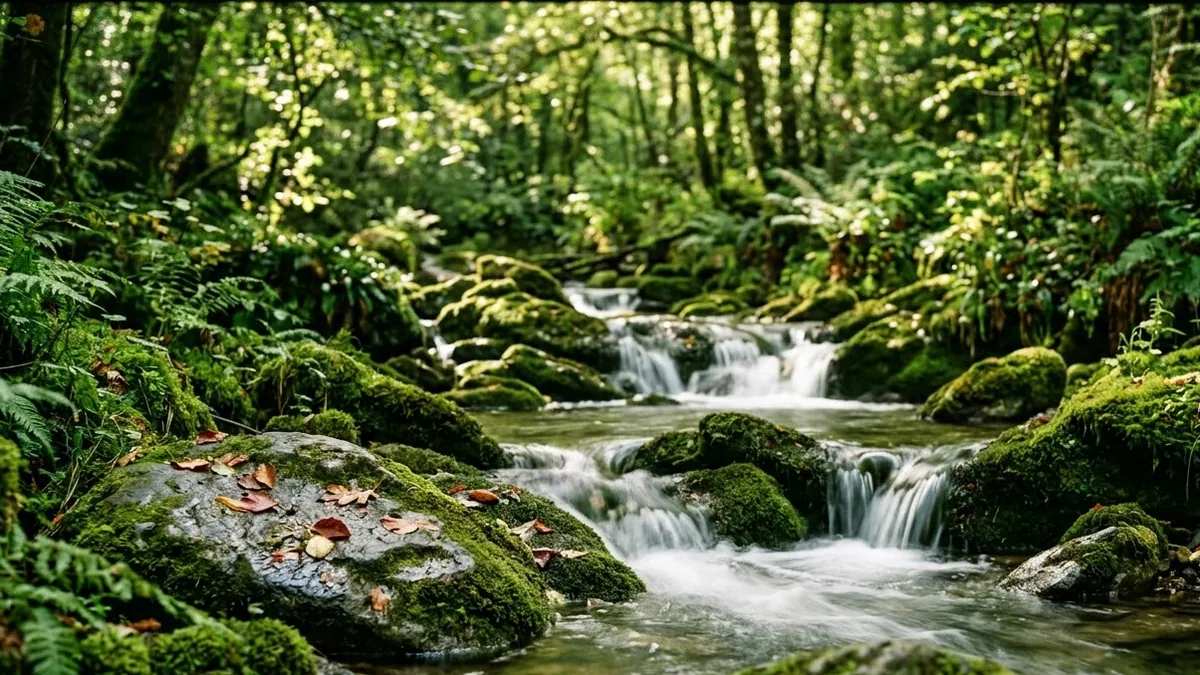
This prompt describes a clear stream over mossy rocks in a green forest, with dappled sunlight, small ripples, tiny waterfalls, swaying ferns and a few leaves drifting on the water.
A clear stream flowing over mossy rocks in a green forest, dappled sunlight, small ripples and tiny waterfalls, ferns swaying, a few leaves drifting on the water, soft flowing water and birdsong, fixed camera, seamless loop. Camera style: [LOCKED-OFF / SLOW DRIFT / HANDHELD].
Slow water and sunbeams work well for relaxing background videos.
Get a better result
A calm, fixed shot of a clear stream over mossy rocks in a green forest, with dappled sun, ripples, small falls, swaying ferns, leaves drifting and the sound of water and birds.
A relaxing loop needs steady motion and no surprises, so the prompt fixes the camera and keeps the action small: water over mossy rocks, ripples, swaying ferns and a few leaves drifting. Dappled sunlight adds sparkle without changing the calm. Birdsong and flowing water give it a soundscape people leave on for hours. Choosing a locked-off camera in the style blank makes the loop easiest to join without a visible jump.
The loop has a visible jump.
Fix: Choose the locked-off camera option. Trim and crossfade the ends in an editor, since the water never repeats exactly.
- Leaves float upstream. Ask for a few leaves moving slowly with the current, all in one direction.
- The water looks like glass. Ask for small ripples and white water on the rocks.
Ask for snow on the rocks and banks, ice at the edges and the stream still flowing in the middle.
a seamless loop, steady flow and the same light at the start and end, soft water sound
More video generation prompts
See all 489 →
More like this
- Study-with-me desk videoVeo · Kling · Seedance
- Cute jelly blob loopKling · Seedance · Veo
- Countdown timer intro for a live streamKling · Veo · Seedance
- Fairies in a glowing forestVeo · Kling · Seedance
- Coffee shop ambience loopVeo · Kling · Seedance