Control your Android phone from your PC, free
Published
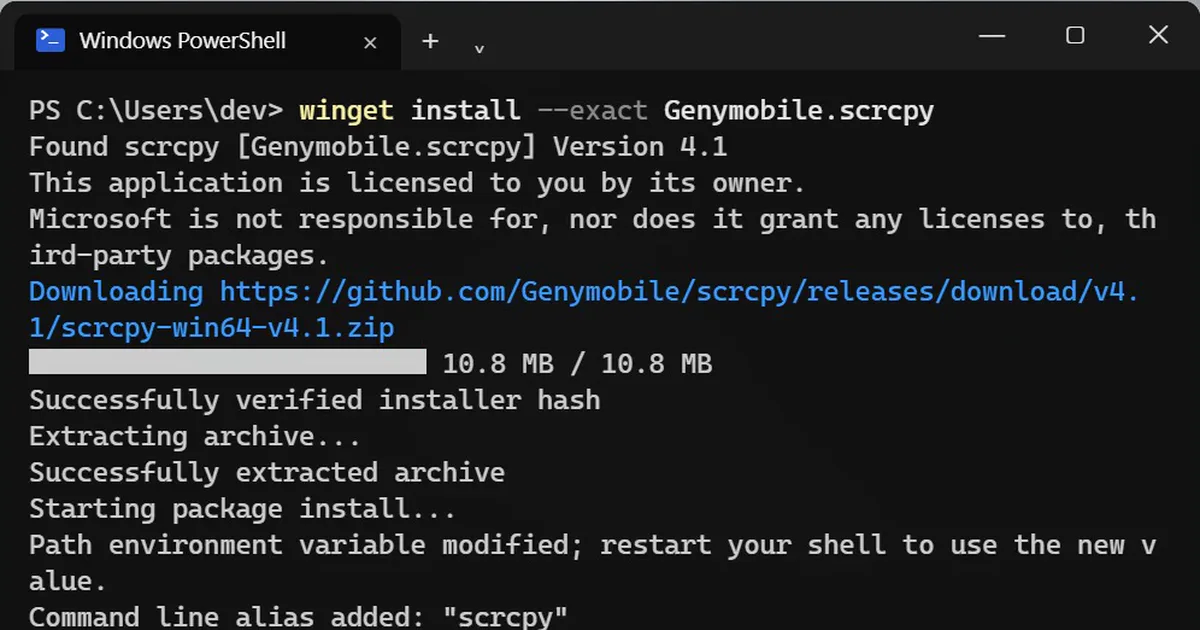
Short answerInstall scrcpy with winget install --exact Genymobile.scrcpy, turn on USB debugging on your phone, plug it in, tap Allow, and type scrcpy. Your phone's screen opens in a window on your PC. Add -S to switch the phone's own screen off while you use it. Android only.
Replying to messages on a tiny screen while your PC keyboard sits right there? scrcpy (short for "screen copy") shows your Android phone in a window on your PC. You type with your keyboard and click with your mouse. Its page describes it as free and open source, with no account, no ads, no internet needed and nothing left installed on the phone.
It works with Android phones running Android 5.0 or later. It does not work with iPhone.
Step 1: Install scrcpy
On Windows, open PowerShell or Terminal and run:
winget install --exact Genymobile.scrcpy
scrcpy's Windows guide says the winget install brings ADB, the Android tool it needs, along with it. Close and reopen the terminal afterwards.
On a Mac with Homebrew:
brew install scrcpy
brew install --cask android-platform-tools
Step 2: Turn on USB debugging
- On the phone, open Settings, then About phone, and tap Build number seven times. This unlocks Developer options. (On Samsung, Build number is under Software information.)
- Open Developer options and turn on USB debugging.
- Plug the phone into the PC with a USB cable and tap Allow on the phone.
Menu names vary between phones. Search your phone's settings for "Build number" if you cannot find it.
Step 3: Start it
scrcpy
Your phone's screen opens in a window. Click to tap, scroll with the mouse wheel, and type with your keyboard.
Things you can do
- Send a file: drag a photo or PDF onto the window, and it lands in the phone's Download folder.
- Install an app file: drag an
.apkfile onto the window to install it. - Copy and paste: text you copy on the phone can be pasted on the PC. Text you paste from the PC goes into the phone's clipboard, where any app can read it, so do not paste passwords that way.
Turn the phone's screen off
scrcpy -S
The phone's own screen switches off while you keep using it on your PC. It saves battery, and nobody near the phone can see what you are doing.
Use the phone's camera
On Android 12 or newer, this shows the phone's camera in a window on your PC:
scrcpy --video-source=camera
Go wireless
With the phone still plugged in, run scrcpy --tcpip once. It switches the connection to Wi-Fi, so you can unplug the cable. Both devices need to be on the same Wi-Fi.
Stay safe
USB debugging gives a connected computer deep access to your phone. Only tap Allow for your own PC, and turn USB debugging off in Developer options when you are done.



Comments
No comments yet. Be the first to share what worked for you.