See where a short link goes before you click it
Published
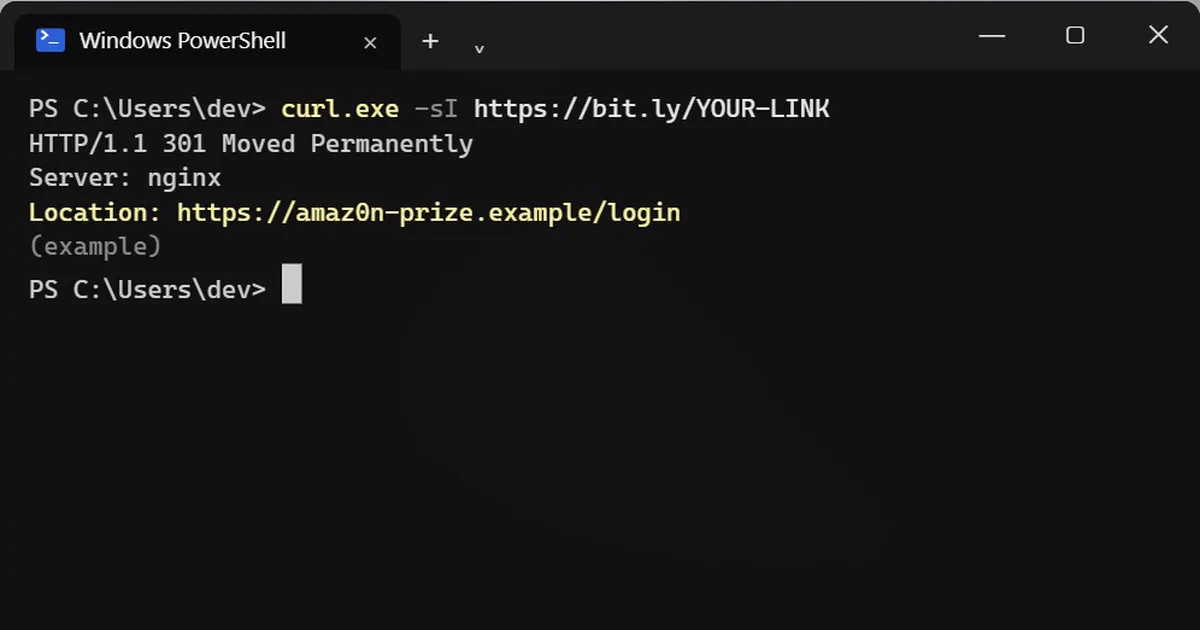
Short answerOpen a terminal and run curl.exe -sI followed by the link (on a Mac, just curl -sI). The Location line is where the link sends you. Add a capital L, as in -sIL, to see every address it bounces through. Read the domain carefully before you open anything.
Short links hide where they go. Scam messages use them because "bit.ly/something" looks harmless. You can ask the link where it points without opening it in your browser.
Step 1: Check the link
Open PowerShell or Terminal and run this, with your link in place of the example:
curl.exe -sI https://bit.ly/YOUR-LINK
-I asks only for the reply's headers, not the page, and -s hides the progress bar. Look for the Location line:
HTTP/1.1 301 Moved Permanently
Server: nginx
Location: https://amaz0n-prize.example/login
That is where the link sends you. In this example, "amaz0n" is spelled with a zero, so it is not Amazon. Close the message.
Type curl.exe, not curl
In Windows PowerShell, plain curl runs a different command (Invoke-WebRequest) that prints something else. Typing curl.exe runs the real curl, which is built into Windows 10 and 11. On a Mac, type curl.
See every stop
Some links bounce through two or three addresses before the real one. Add a capital L to follow them all:
curl.exe -sIL https://bit.ly/YOUR-LINK
Each Location line is one stop. The last one is where you would end up.
Just the final address
If you only want the next address and nothing else, this prints it on its own:
curl.exe -s -o NUL -w "%{redirect_url}" https://youtu.be/dQw4w9WgXcQWe ran it on that YouTube link. It points to a very famous music video, so now you can check before you get Rickrolled.
What this can and cannot tell you
- curl does contact the link's server, so the link owner can see that someone checked it. It does not load the page or run anything on it.
- It only shows normal web redirects. Some pages forward you with code inside the page, and curl will not show those.
- A real-looking address can still be a scam. Read the domain name carefully, letter by letter, and when in doubt, go to the company's site yourself instead of using the link.



Comments
No comments yet. Be the first to share what worked for you.