- Updated
Residential tower launch film
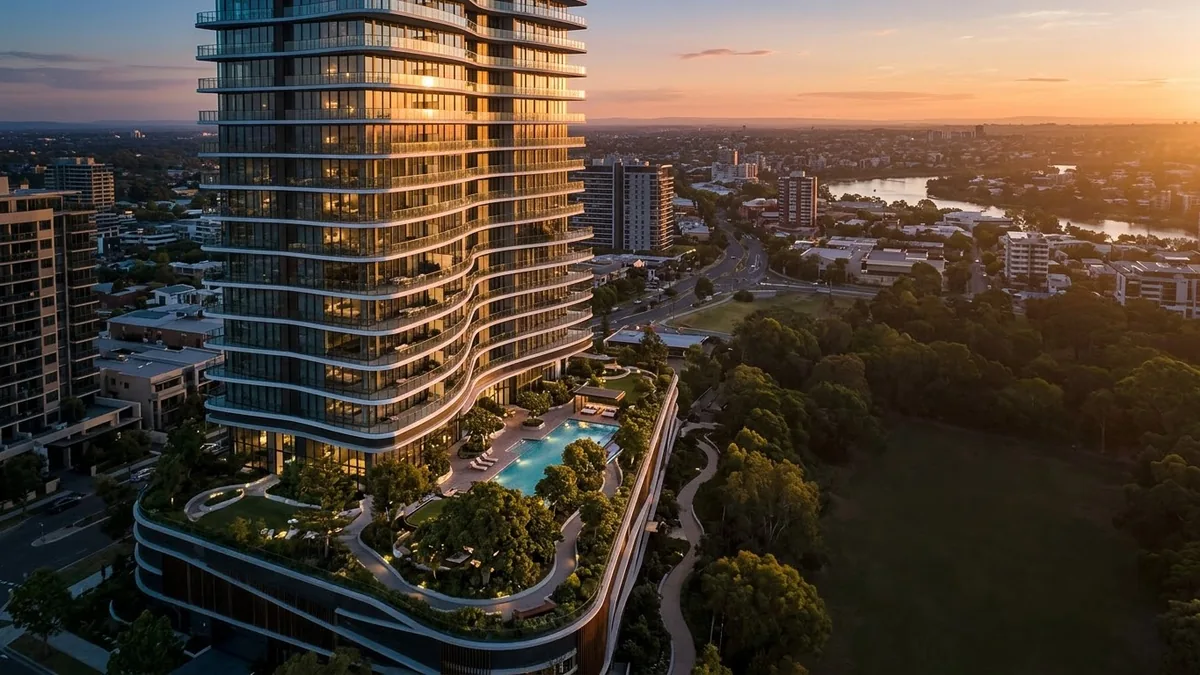
This prompt describes a drone rising to reveal a modern residential tower at golden hour, with glass balconies glowing, a landscaped podium garden and a family on a terrace. Do not show amenities that will not exist.
A drone rising to reveal a modern residential tower at golden hour, glass balconies glowing, a landscaped podium garden, a family on a terrace, a rooftop pool, a smooth glide through the lobby, refined orchestral music, luxury real estate launch film. Brand name: [BRAND]. Tone: [WARM / ENERGETIC / PREMIUM].
Use an invented project name and a golden-hour drone reveal.
Get a better result
A luxury launch film: a drone rising to reveal a modern residential tower at golden hour, glowing glass balconies, a landscaped podium garden, a family on a terrace, a rooftop pool and a smooth glide through the lobby.
Real estate films sell a lifestyle before the building is finished, so the prompt moves from a drone reveal to amenities and people using them. Golden hour makes glass and greenery glow. A smooth glide through the lobby adds a premium feel, and refined music fits the tone. Showing only real features keeps the film honest.
The tower looks like a famous real building.
Fix: As the tip says, use an invented project name and design, such as “slim tower with curved balconies”.
- The film promises features you do not have. Only show what the project includes. Remove the rooftop pool if there is none.
- Text or a brand name is misspelled on the building. Ask for no signs on the building and add your logo in the edit.
Make a night version with the windows lit, the pool glowing blue and city lights below.
an invented slim tower with curved balconies, no signs on the building, only the amenities the project really has
More video generation prompts
See all 489 →
More like this
- Smartphone launch teaserVeo · Kling
- Safari at golden hourVeo · Kling · Seedance
- Book launch event posterGemini · ChatGPT · Midjourney
- Dubai skyline drone revealVeo · Kling · Seedance
- Wizard tower at duskMidjourney · Gemini · ChatGPT