- Updated
Turn a still photo into a timelapse
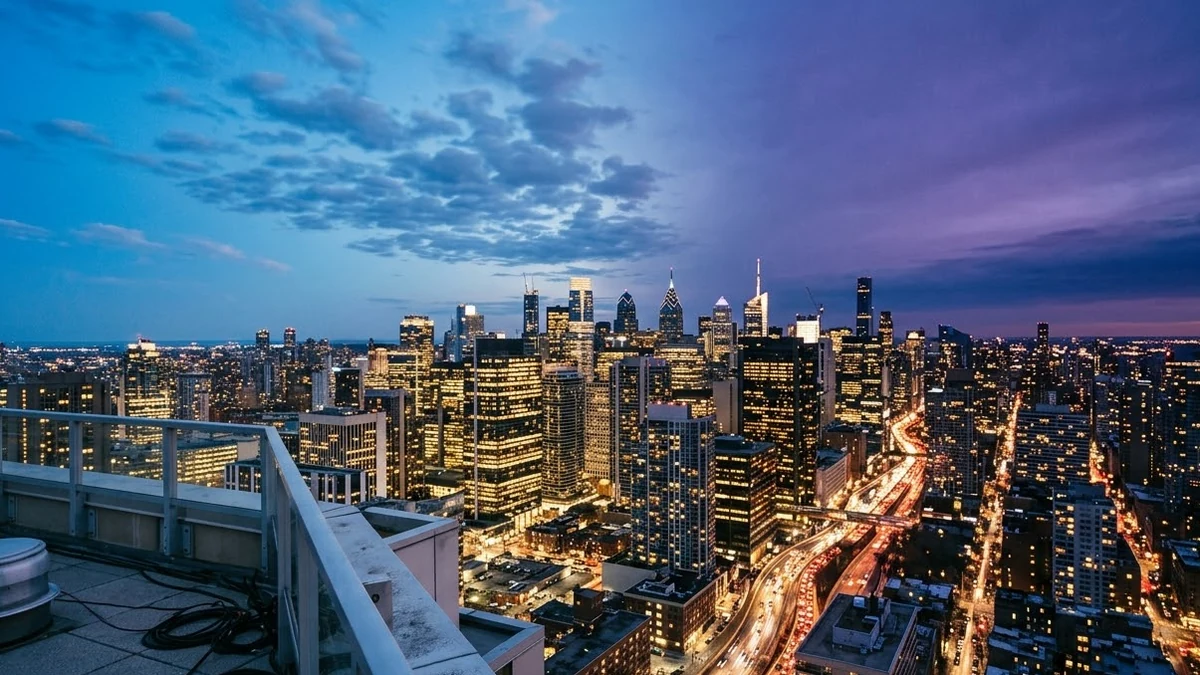
This prompt turns a photo of a scene into a timelapse with clouds racing across the sky and the light changing.
Turn this photo of [SCENE] into a timelapse: clouds race across the sky, light changes from [START LIGHT, e.g. afternoon] to [END LIGHT, e.g. golden sunset], shadows slowly stretch, lights turn on in the windows. Locked camera, keep the buildings and landscape exactly the same, 6 seconds.
Pick a scene with a clear sky and buildings for the best effect.
Get a better result
A six-second timelapse made from your photo: clouds racing across the sky, light changing from your start to your end time, shadows stretching and window lights coming on, with the camera locked and the scene unchanged.
Real timelapses take hours of filming, so this prompt fakes one from a single photo by moving only what changes over a day: clouds, light, shadows and window lights. Locking the camera and freezing the buildings keeps the effect believable. Naming the start and end light gives the AI a clear path for the colours to follow.
The buildings warp or shift.
Fix: Keep “locked camera” and “keep the buildings exactly the same”. Pick a photo shot on a tripod or held very still.
- There is little sky, so not much changes. As the tip says, use a photo with a large, clear sky. The clouds and light do most of the work.
- Shadows move the wrong way. Say where the sun sets in your photo, such as “sun setting behind the hills on the left”.
Ask for the reverse: stars fading, the sky turning pink, window lights switching off one by one and the first sunlight on the rooftops.
locked camera with nothing in the scene moving except the sky, light and shadows, the sun setting behind the hills on the left
More video generation prompts
See all 489 →

More like this
- Building Explosion video promptHiggsfield · Kling · Veo
- 3D printer building an objectVeo · Kling · Seedance
- Hyperlapse through the city at duskHiggsfield · Kling · Veo
- Thunder God video promptHiggsfield · Kling · Veo
- Disintegration video promptHiggsfield · Kling · Veo