- Updated
Fintech app promo
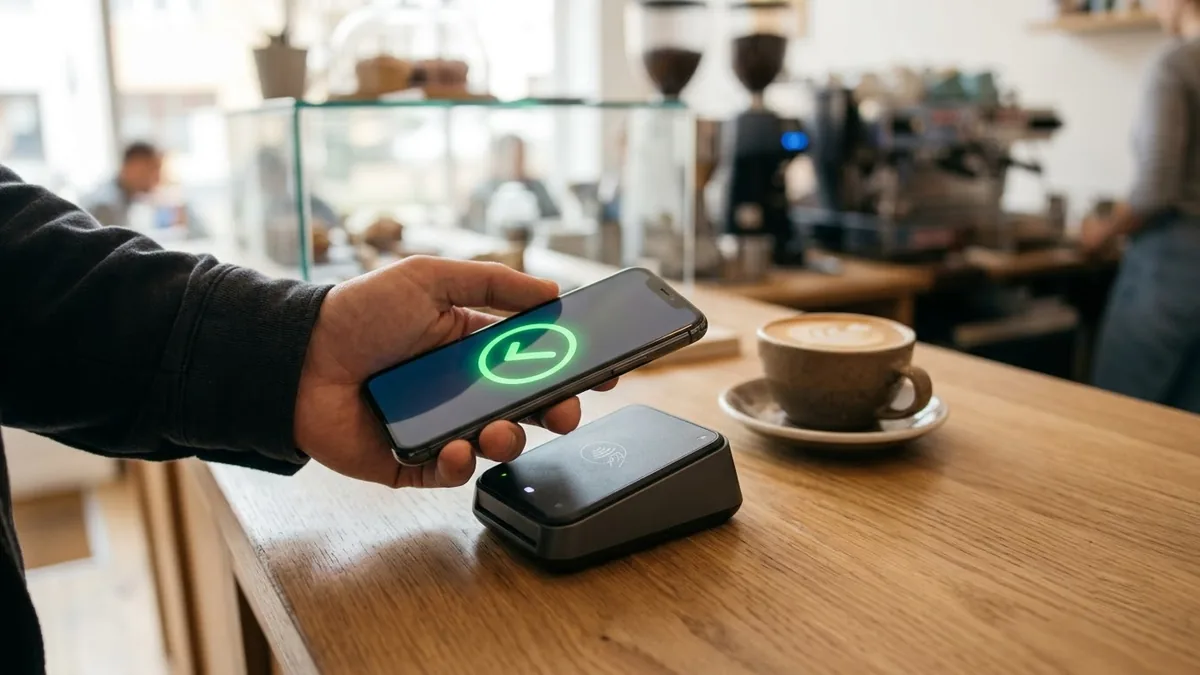
This prompt describes a person paying a bill with a smartphone in seconds, a savings goal ring filling up and a coffee-shop payment with a subtle green tick, in clean UI overlays.
A friendly promo showing a person paying a bill with a smartphone in seconds, a savings goal ring filling up, a coffee-shop payment with a subtle green tick, clean UI animations floating in the frame, bright modern colours, upbeat music, money app advertisement. Brand name: [BRAND]. Tone: [WARM / ENERGETIC / PREMIUM].
Keep the interface abstract and focus on the feeling of ease.
Get a better result
A friendly money app promo with a person paying a bill in seconds, a savings ring filling, a coffee payment with a green tick and clean abstract UI floating in a bright frame.
Money apps sell ease and trust, so the prompt shows quick moments: a bill paid in seconds, a savings ring filling and a green tick at a cafe. Keeping the interface abstract, as the tip says, avoids fake screens. The tone blank sets how calm or lively it feels.
The screen shows fake numbers.
Fix: Keep the interface abstract, as the tip says, with shapes and ticks only, then add real screens in your editor.
- The ad implies returns or guarantees. Do not show growing money or promise returns. Financial ads have strict rules, so check them before posting.
- The phone has a real brand logo. Ask for an unbranded phone with a plain back and a blank screen edge.
Ask for friends at a dinner table splitting the bill on their phones, with ticks popping up one by one.
a calm, easy mood, the phone screen showing only simple shapes and a green tick, no money amounts
More video generation prompts
See all 489 →

More like this
- School admissions promoVeo · Kling · Seedance
- Saree boutique promoVeo · Kling · Seedance
- Friendly dental clinic promoVeo · Kling · Seedance
- Yoga studio promoVeo · Kling · Seedance
- Beauty salon promo reelVeo · Kling · Seedance