- Updated
Quote slide for a presentation
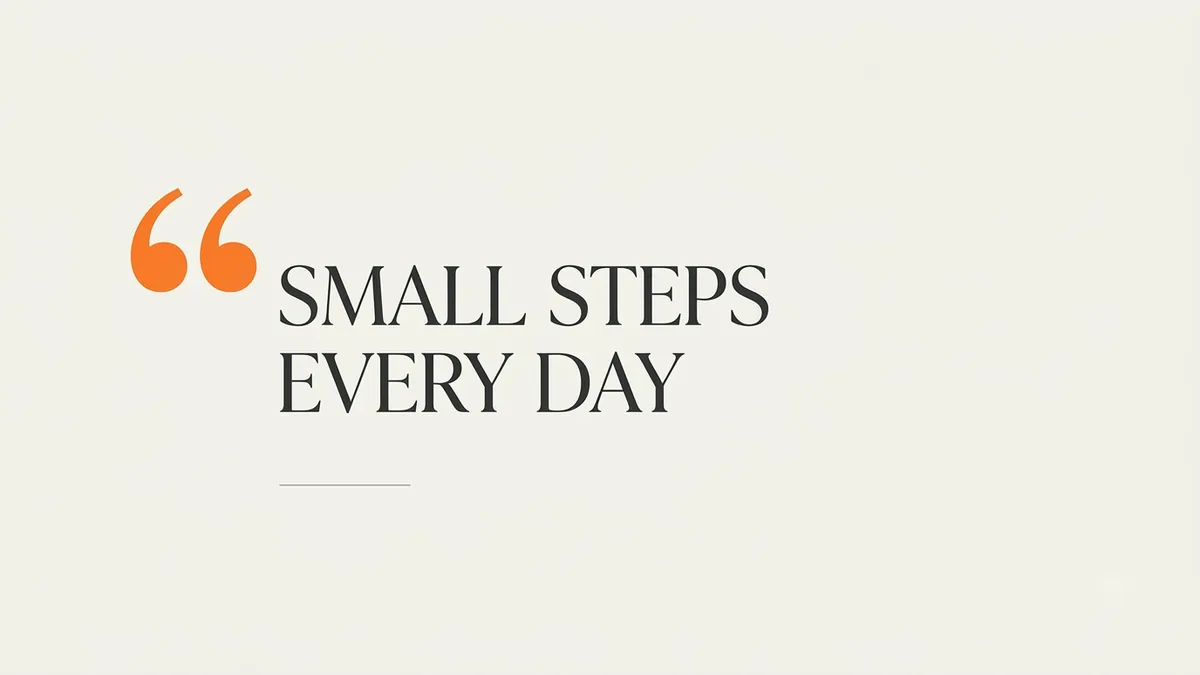
This prompt makes a presentation slide with a large stylish quotation mark, your quote in elegant serif type and the attribution below in small caps on a soft coloured background.
Presentation slide with a large stylish quotation mark and the quote "[QUOTE]" in elegant serif type, attribution "[NAME]" below in small caps, a soft [COLOUR] background with a subtle texture, generous margins, calm and impactful. --ar 16:9
Keep the quote under 20 words and credit the source.
Get a better result
A presentation slide with a large quotation mark, your quote in elegant serif type, the speaker’s name in small caps below, and a soft textured background with wide margins.
A quote slide is about one sentence, so the prompt gives it a large quotation mark, elegant serif type and wide margins, and keeps everything else soft. Putting the name in small caps below gives credit without competing. A subtle textured background adds warmth to an otherwise empty slide, and keeping the quote under 20 words, as the tip says, keeps the type large enough to read from the back of a room.
The quote comes out with wrong or missing words.
Fix: Keep the quote under 20 words, as the tip says. If a letter is wrong, make the background only and set the words in your slide software.
- The text is too small to read from the back of a room. Say “the quote fills about half the slide width in large type, the name much smaller”.
- The background texture fights with the words. Ask for “a very subtle texture, low contrast, nothing behind the text but the colour”.
Change the background to “deep navy” and add “the quote in warm ivory type, a thin gold line under it”. Check the contrast on a projector before the talk.
Keep the quote short, large and centred, the name small below it, with a very subtle low-contrast background and wide margins.
Guides that use this prompt
More image generation prompts
See all 347 →


More like this
- Build a presentation outline in minutesChatGPT · Gemini · Claude
- Beautiful quote post for social mediaIdeogram · ChatGPT · Gemini
- International Women's Day postGemini · ChatGPT · Midjourney
- Carousel post scriptChatGPT · Gemini · Claude
- Check an AI answer for mistakesChatGPT · Gemini · Claude